Windows desktop SQL log analyzer – no cloud
Run SQL on your logs directly on your machine
Analyze IIS logs, Windows Events, text files, CSV/TSV, JSON, XML, registry, file system, Active Directory and databases using SQL — with everything processed locally.
If you know SQL, you’re productive immediately. If you don’t, AI can now write your queries for you. Point LPL at a folder of logs and you’re analyzing within minutes.
Stop wrestling with logs. Start understanding them.
- For devs, ops, SRE, auditors, security and forensics teams.
- Perfect for debugging, incident response, threat hunting and monitoring.
- No servers, no cloud backend, no data upload — everything stays on your PC.
SELECT DISTINCT src-ip
FROM pfirewall.log
WHERE action = 'DROP';

SELECT TOP 100 *
FROM c:\webserver.log
WHERE sc-status <> 200;

SELECT cs-uri-stem, COUNT(*) AS Hits
FROM c:\InetPub\Logs\ex*.log
GROUP BY cs-uri-stem
HAVING COUNT(*) > 50;Where it helps
Use Log Parser Lizard when you need fast, ad-hoc insight into logs and text-based data, without shipping data to a cloud service or loading everything into a database or SIEM.
Forensics
Investigate security incidents across web, firewall and system logs with SQL queries, pivots and visualizations – all on your local workstation.
Operations & DevOps
Debug production issues by correlating IIS, app logs (log4j, log4net, NLog, Serilog) and database traces without standing up an ELK/SIEM stack.
BI & ETL
Use the built-in ETL/SQL capabilities plus exports, dashboards and reports for capacity planning, trend analysis and reporting.
 Follow @lizardlabs


Core features
Log Parser Lizard extends Microsoft Log Parser concepts with a modern UI, advanced query editor, powerful grid, and full visualization and export stack. It’s optimized for local, offline, desktop use.
SQL log querying
- Standard SQL: SELECT, WHERE, GROUP BY, HAVING, ORDER BY, joins, unions, functions and aggregates.
- Query logs, Windows Events, text, JSON, XML, CSV/TSV, registry, file system, AD and databases.
- No need to load data into a database first – query directly from files and Windows sources.
Modern user interface
- Office-style tabbed interface with ribbons for query, results, dashboards and reports.
- Designed for power users who spend hours per day working with logs.
- Open multiple queries and views side-by-side and organize them in workspaces.
Advanced query editor
- Syntax highlighting and auto-completion for Log Parser, T-SQL and OLE DB queries.
- Code snippets, query constants and reusable samples.
- Inline .NET code for custom functions and data sources when you need extra power.
Query management
- Organize queries into folders and libraries for repeated investigations.
- Store patterns for forensic triage, performance analysis, compliance checks and more.
Data navigation & filtering
- Excel-like grid with sorting, grouping, searching and filtering.
- Conditional formatting, formula columns, column chooser and split views.
- Advanced filter UI with query builder, instant find and auto-filter row.
Performance & scale
- Handles very large log files; practical limits are hardware-based, not format-based.
- Optimized to stay responsive even with complex queries and large datasets.
Workspace preview
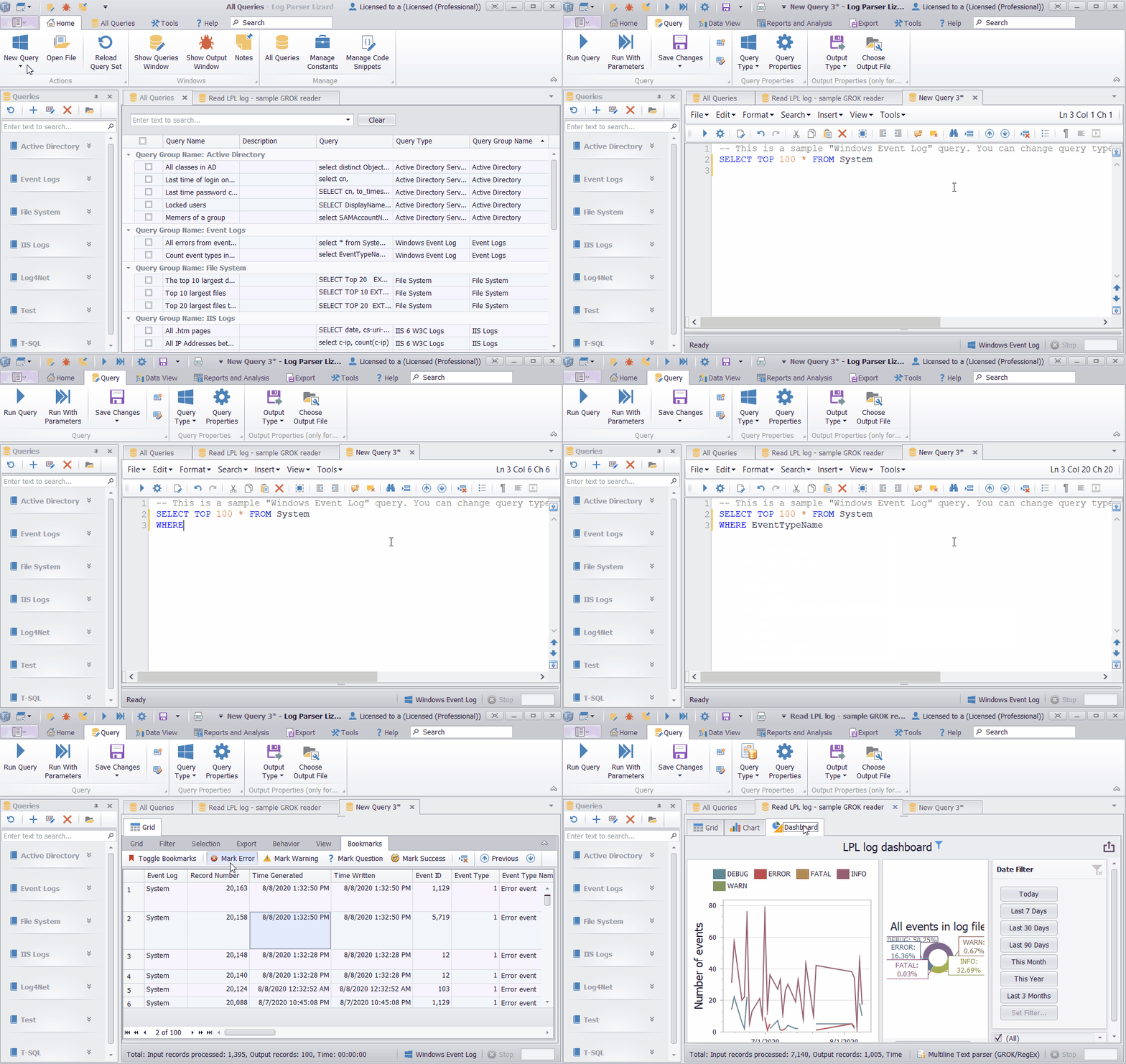
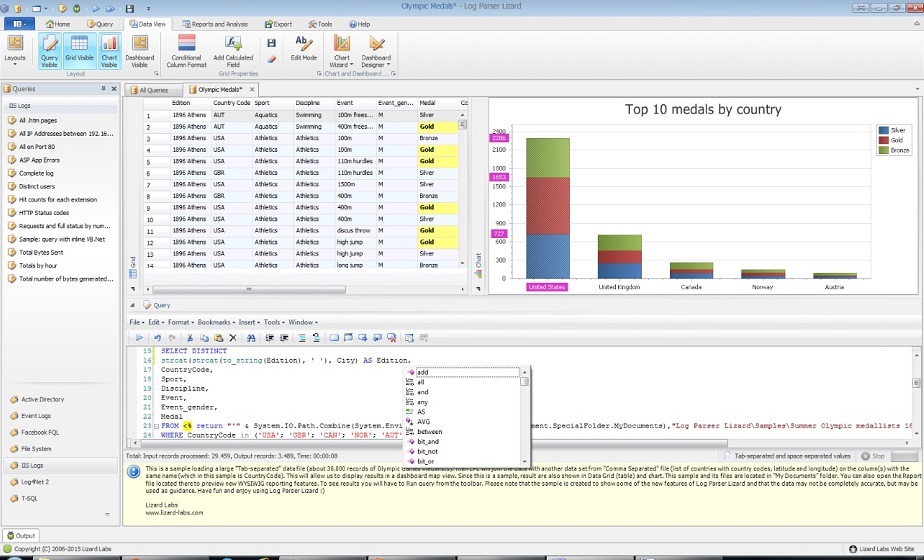
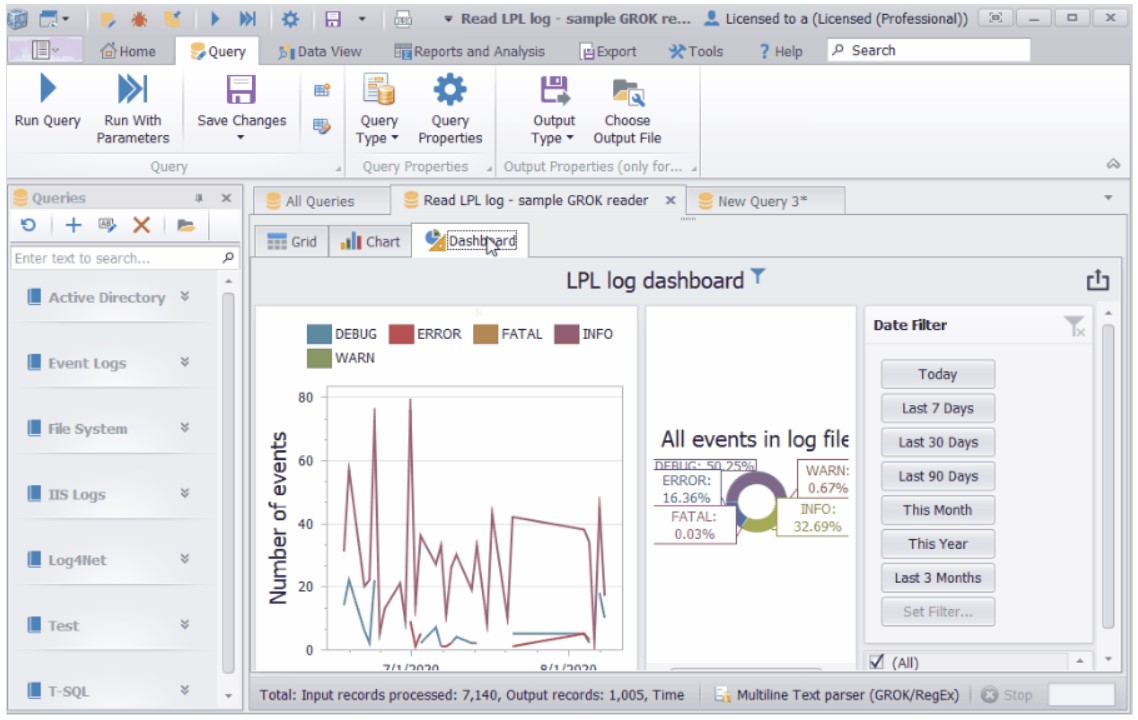
See Log Parser Lizard in action with these screenshots of the query editor, grid, charts, dashboards and report designer.
- Main workspace with query editor, grid and results.
- Dashboard view: charts + pivot tables.
- Report designer with preview.
Dashboards, pivot tables and reports
Move beyond rows and columns. Log Parser Lizard includes pivot tables, tree maps, dashboards and a WYSIWYG report designer for local reporting and data visualization.
Pivot grid & tree map
Multi-dimensional analysis for counts, sums and trends across fields and time – perfect for security statistics, capacity planning and operations metrics.
Dashboards
Drag-and-drop charts, grids, cards, gauges, maps and pivots into dashboards; bind data, filter and drill-down directly in the desktop designer.
Report designer
Word-like report designer combined with banded reporting for printable and shareable incident reports and summaries.
Printing & export
Export to XLS/XLSX, PDF, RTF, TXT, MHT, CSV/TSV, HTML, images and XML (DataSet). Includes advanced print preview for local reporting.
Automation & Web API
Command line & ETL
Combine the ETL pipeline with automation to run saved queries from scripts and scheduled tasks. Export results directly to files or databases without any cloud components.
Built-in Web API server
Integrated web server exposes query results as JSON over HTTP on your local network. Use it as a lightweight data service for internal dashboards, scripts or other tools.
Supported input formats & data sources
Log Parser Lizard gives you SQL access to a wide range of text-based and Windows data sources. Any log file can become a queryable “table,” without sending data outside your environment.
- W3C Extended log files: IIS, FTP, Apache, Exchange, SharePoint, firewalls, ISA Server, Windows Media, SMTP, etc.
- IIS W3C logs and IIS log file format.
- IIS centralized binary log files.
- HTTP error logs and URLScan logs.
- Windows Event Log (local/remote, all channels, .evtx backups).
- Enterprise Tracing for Windows (ETW).
- File system enumeration (files, folders, metadata).
- Media files metadata (video, image, audio).
- Registry keys and values (local and remote).
- Active Directory objects via SQL.
- NetMon network captures.
- CSV, TSV and space-separated text files (e.g. Excel, PerfMon output).
- TEXTLINE / TEXTWORD formats for generic text (grep-style, but SQL-powered).
- Generic XML documents and configuration files.
- JSON-formatted logs.
- Log4j / log4net XML logs and multi-line RegEx formats (log4net, NLog, etc.).
- GROK / RegEx text parser, including compressed/encrypted .gz logs.
- SQL Server (T-SQL queries).
- OLE DB SQL (MySQL, Oracle, Access, PostgreSQL, etc.).
- Google BigQuery for external large-scale data when needed.
- SQLite and SQL Server Compact.
- C# .NET data sources (run C# code and show results in the grid).
- VB.NET data sources.
- PowerShell script data sources.
- Log Parser COM input plugins for custom data sources.
- HTML table reader.
- Excel file reader.
- “Ultimate dates” and “ultimate numbers” utility tables.
Licensing & free features
Log Parser Lizard is completely free to use. There is no license key, no activation server and no subscription. Most features are available out of the box and all processing stays on your Windows machine.
Who can use it
- Commercial entities can fully use all features, but without the expectation of support.
- Individuals (home lab, personal or profit projects) have access to all features, with no guaranteed support.
- Educational institutions and students can use it for learning, training and research, without support obligations.
- Government agencies at any level can use all features, but should not rely on formal support or clarifications.
Important notes
- Activation is straightforward – no extra downloads, and you can start in under a minute.
- Requests for support may not be answered. If you require guaranteed support or SLAs, this software may not be suitable.
- Licensing terms are intentionally simple so you can focus on analysis, not paperwork.
For transparency: we are considering an optional company-wide subscription for very large organizations (for example, companies with annual revenue above USD 50M), with a flat fee that would cover unlimited internal users.
A draft model could be USD 3,990 per year for company-wide use (all employees, on internal machines), but this is not active yet.
If you are interested, you can click the link below – currently it only shows an informational message while this option is being evaluated:
Learn more about experimental enterprise/company-wide licensing
What others say
Log Parser Lizard is frequently mentioned in blogs, books, training courses and security talks as an essential companion to Microsoft Log Parser.
“What's this? Oh YES. It's intellisense and tooltips, baby! I can't say how much faster this tool made me once I had figured out LogParser.”
— Scott Hanselman, Principal Program Manager at Microsoft, from his blog and Ultimate Developer and Power Users Tool List for Windows .
“Log Parser Lizard is one of those indispensable tools that treads lightly on your system but offers a huge bang for the buck.”
— Russ McRee, security professional and ISSA Journal columnist, from toolsmith: Log Parser Lizard
“Log Parser is often misunderstood and underestimated. It could possibly be the best forensics tool available today and it's free! ... Log Parser Lizard is a free GUI for Log Parser.”
— SANS Institute (Internet Storm Center / Holistic InfoSec blogs and forensics resources)
On Twitter/X
“Super nice UI, made some custom queries and it worked like a charm for tracking Hafnium activity!”
— @Carlos_Perez (Darkoperator), March 15, 2021
From blogs
“Anyone that has taken a look into an IIS log knows that they can be hell. ... Step in Log Parser Lizard.”
— Dombat Blog, August 6, 2015, blog post
Log Parser Lizard also appears in:
- The Chinese book “Website invasion scene” , where LPL is used to analyze hacking techniques via web logs.
- Pluralsight course Log Parser Fundamentals .
- RSA Conference talk “Evil Through the Lens of Web Logs” .
- Numerous books on Google and Amazon , and editor awards such as Software Informer and Softpedia 100% clean award .
FAQ
Both desktop and cloud-based log analysis tools solve similar problems but in different ways. Log Parser Lizard focuses on fast, private, on-device analysis, while cloud platforms are optimized for centralized monitoring. Here is a simple comparison:
✔ Desktop tools (like Log Parser Lizard) — Pros
- No data leaves your machine — preferred for security, forensics, regulated environments.
- Immediate results — open a log file and query it instantly, no ingestion delay.
- No infrastructure required — no servers, cloud accounts, agents, or pipelines.
- Local performance — full CPU/SSD speed of your workstation.
- Perfect for debugging & development — fast ad-hoc analysis for developers and SRE/ops.
- Great for DFIR and audits — works offline or in isolated environments.
✔ Desktop tools — Cons
- Not ideal for multi-user collaboration or org-wide dashboards.
- No long-term retention or alerting unless you automate it externally.
- Bound by workstation hardware limits (RAM, disk, CPU).
✔ Cloud / Web-based log analysis — Pros
- Centralized visibility across teams and environments.
- Long-term retention, correlation and automated alerting.
- Scales horizontally for large volumes of data.
- Good for continuous monitoring and operational dashboards.
✔ Cloud / Web tools — Cons
- Requires uploading logs to external systems or cloud providers.
- Ingestion pipelines, agents, and storage fees can add up.
- Not ideal for sensitive investigations or offline forensics.
- Setup and maintenance overhead for smaller teams or individuals.
✔ User Interface: Desktop vs. Web — Important differences
- Desktop apps support richer UI components — advanced grids, pivot tables, multi-pane views.
- Zero-latency interactions — no network round-trips when filtering, sorting or navigating data.
- True multi-window workflow — open multiple queries, dashboards, reports side-by-side.
- Drag-and-drop support — logs, folders, datasets, files.
- Keyboard-driven productivity — shortcuts, power-user navigation, instant filtering.
- Deep OS integration — file system access, registry, Windows Events, AD queries, ETL tools.
- Offline-safe UX — analyze logs on isolated or secure machines without connectivity.
Summary:
Cloud platforms excel at centralized monitoring, alerting and long-term storage.
Desktop tools like Log Parser Lizard are unmatched for fast, private, interactive analysis
on your own machine — especially for developers, operations, DFIR and on-demand investigations.
Yes. Log Parser Lizard is still actively used by administrators, security teams and developers around the world. It continues to be maintained and developed, with updates focused on compatibility, usability improvements and new input formats or scenarios as they appear.
No. Log Parser Lizard is a Windows desktop application. All parsing, querying and visualization is done locally on your machine. Logs are not sent to our servers or to any cloud service unless you explicitly export them somewhere.
Microsoft Log Parser 2.2 is optional. Log Parser Lizard works fully on its own, but using Microsoft Log Parser is highly recommended for unlocking its full potential. LPL was originally developed as an advanced GUI for Microsoft Log Parser, so combining both tools gives you maximum input format coverage, performance and query capabilities.
Log Parser Lizard is a Windows desktop application and runs on supported Windows versions with .NET 4.x installed.
Yes. Combining SQL queries with advanced filtering, dashboards and reports makes it well suited for log forensics, threat hunting and auditing scenarios where data must remain on-premises.
Yes. Use the command line and built-in Web API to run saved queries on a schedule, export to Excel/PDF/CSV/HTML, or feed data into your own on-prem dashboards and tools.
Use the Ideas & Bugs form in the top menu or footer to suggest features, report issues or share how you use Log Parser Lizard.
Why choose Log Parser Lizard?
Because logs tell the real story — and you shouldn’t need a cloud subscription, a SIEM cluster, or a 30-minute ingestion pipeline just to read them.
With LPL, your data stays on your machine. You get instant results, rich UI tools, dashboards, pivots, and the full speed of your CPU and SSD. For developers and operations teams, it’s the fastest way to answer “what actually happened?”
Download it, open your logs, write (or generate) a SQL query — and get answers immediately.
Start analyzing your logs locally with SQL
Download Log Parser Lizard, point it at your logs, Windows Events or databases, and start querying in minutes – with no cloud deployment or extra infrastructure.
Log Parser Lizard is a pure desktop application. It does not transmit logs, queries, analytics, or any usage data. Nothing is sent anywhere unless the user explicitly chooses to export or share data.
The installer is routinely scanned with VirusTotal, and we are proud that it is consistently flagged as clean by all major antivirus engines. You can review the current public report here: VirusTotal scan.
Latest downloads: Download page • Direct MSI